
Table of Contents
If you’ve run a coordination meeting on any project bigger than a house extension, you already know the drill. Someone exports a federated model from Navisworks or Solibri, hits run, and comes back to a report with 2,000+ clashes. Half of them are a ceiling tile grazing a sprinkler pipe by 3mm that nobody will ever notice on site. The other half are buried somewhere in that list, and finding them eats up days that nobody budgeted for.
That’s the exact problem AI-powered clash detection was built to fix. Not clash detection itself BIM has done that for two decades but the part that comes after: figuring out which of those thousands of flagged conflicts are actually worth a coordinator’s time.
This guide walks through what AI-powered BIM clash detection is, how it’s different from the rule-based tools you’re probably already using, what the numbers say about ROI, which tools are worth looking at in 2026, and where the technology still falls short Because it does, and any article that doesn’t mention that isn’t being straight with you.
What Is AI-Powered BIM Clash Detection?
Traditional clash detection is purely geometric. Software like Navisworks or Solibri loads a federated model and checks for places where two elements physically intersect, or where they’re closer than a defined tolerance allows. It’s fast and reliable at finding overlaps, but it has no idea whether an overlap is actually a problem.
AI-powered clash detection adds a layer of judgment on top of that. Instead of just flagging every intersection, it uses machine learning to look at the context around each clash what kind of elements are involved, how the same combination played out on past projects, how severe the consequence would be if it went unresolved and then ranks, groups, or filters the results accordingly. Some tools go further and suggest a fix, or predict where a clash is likely to occur before it’s even modeled.
In plain terms: rule-based clash detection tells you where two things overlap. AI-powered clash detection tries to tell you which of those overlaps actually matter, and sometimes what to do about it.
Why This Needed to Happen: The False-Positive Problem
This is the part most articles on this topic skip past too quickly, so it’s worth sitting with the numbers.
Research published on this exact issue found that automated tools like Navisworks can flag a high proportion of false positives in a typical clash report — with some studies putting the figure as high as 60%. A separate study on clash risk and relevance found that only around half of the clashes a system identifies turn out to be true, meaningful conflicts worth a team’s attention. Everything else is noise: a duct that’s technically “clashing” with a ceiling grid that hasn’t been finalized yet, or a cable tray that intersects a wall type that will be adjusted anyway.
Sorting through that noise is what “clash fatigue” refers to in the industry, and it’s a real cost. Coordination teams can spend days each cycle just triaging a report before any actual resolution work starts. That triage time is exactly what AI models are trained to compress — some vendors report cutting a 5,000-alert report down to roughly 50 decisions a coordinator actually needs to make.
How AI-Powered Clash Detection Works, Step by Step
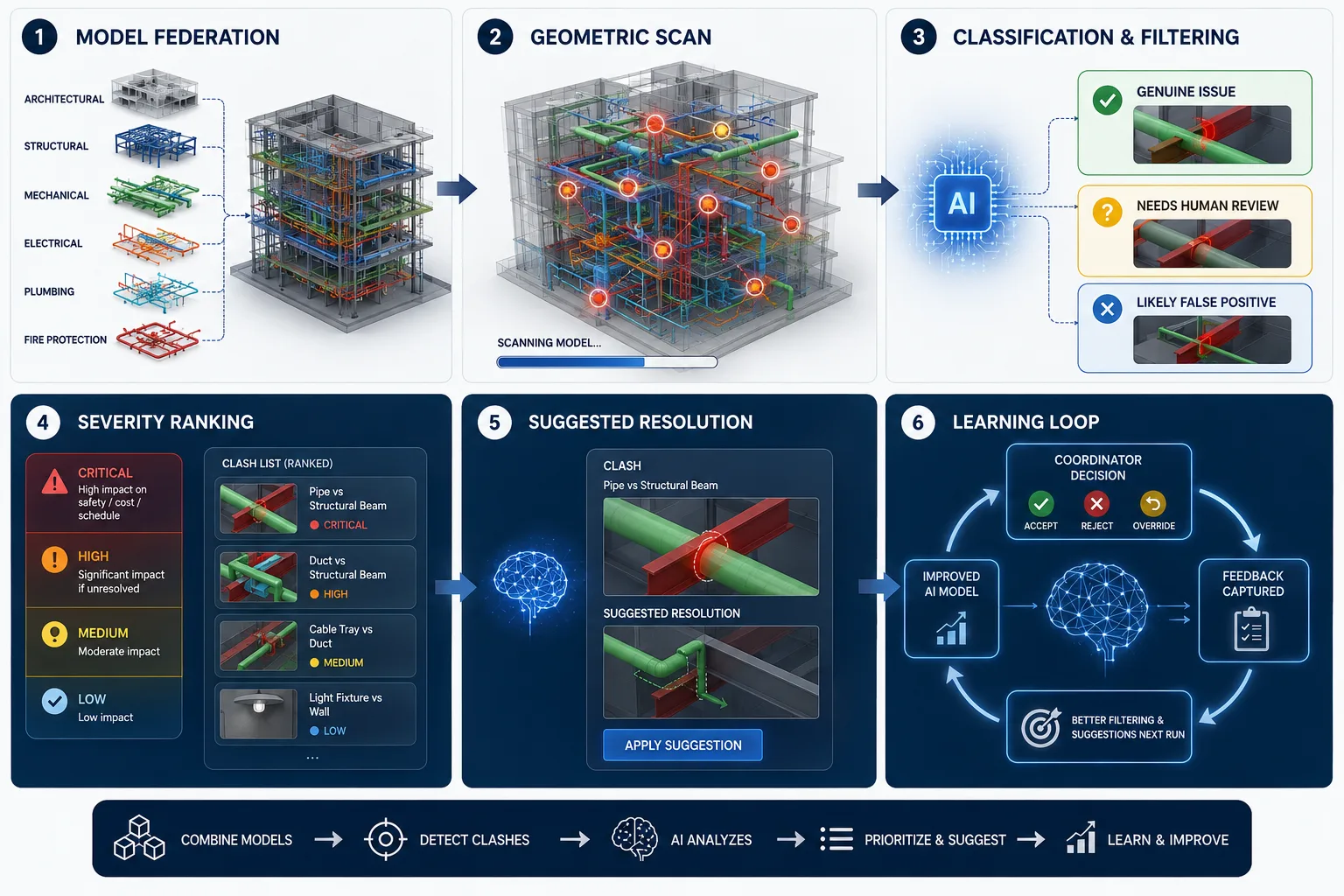
Most platforms follow a similar sequence, even though the underlying models differ:
- Model federation. Discipline models — architectural, structural, mechanical, electrical, plumbing, fire protection — get combined into one shared model, the same first step as traditional clash detection.
- Geometric scan. The system runs the standard interference check, generating the raw list of overlaps and clearance violations. This part hasn’t changed.
- Classification and filtering. This is where AI enters. A trained model looks at each clash’s characteristics — element types, tolerances, location, past resolution outcomes from similar projects — and sorts it into categories: genuine issue, likely false positive, or needs human review.
- Severity ranking. Instead of a flat list, clashes get scored by how much impact they’d have on cost, schedule, or safety if left unresolved. A pipe through a load-bearing beam ranks very differently than a light fixture 2mm from a wall.
- Suggested resolution. More advanced tools propose a fix — reroute a duct, adjust an elevation — based on patterns from resolutions the team has approved before. This is still the least mature part of the stack industry-wide.
- Learning loop. Every time a coordinator accepts, rejects, or overrides a suggestion, that decision feeds back into the model, so the filtering gets sharper on the next run.
The Three Types of Clashes AI Tools Need to Handle
It’s worth being precise here, because “clash” gets used loosely:
- Hard clashes — two elements physically occupy the same space. A duct running straight through a structural column is the classic example. These are non-negotiable and need resolving before installation.
- Soft clashes — elements don’t overlap but violate a clearance rule, like a valve that needs 300mm of access space but only has 150mm. These depend on project-specific tolerance settings, which is exactly the kind of context AI filtering is good at learning.
- Workflow clashes (sometimes called 4D clashes) — not a geometry problem at all, but a scheduling one. Two trades assigned to the same physical zone at the same time. AI models that pull in schedule data can catch these before they become a site-level standoff between crews.
Does It Actually Pay Off? The ROI Numbers
Skip the vague “saves time and money” claims — here’s what the data actually shows:
- Rework tied to unresolved clashes and coordination errors typically runs 4–6% of total construction cost, and that’s only counting the reported, direct instances.
- Resolving a clash inside the model instead of on site can be up to 100 times cheaper.
- The National Institute of Building Sciences estimates every dollar spent on BIM coordination during design avoids roughly $8–$20 in change orders and rework later.
- Some coordination programs report savings of up to 20% of total contract value, with documented cases of 10x return on the coordination investment itself.
- On a real MEP project, switching to AI-assisted clash detection cut average clash resolution time by roughly 70%.
The pattern across all of these is the same: the earlier you catch a conflict, the cheaper it is by an order of magnitude, and AI’s main contribution is compressing the time it takes to find the conflicts worth catching.
AI Clash Detection Tools Worth Knowing in 2026
There isn’t one dominant “AI clash detection” product the way there’s a dominant clash detection product (Navisworks, for most closed-BIM, Autodesk-centric teams). Instead, AI capability is showing up in a few different places:
| Tool | Best for | AI angle |
| Autodesk Navisworks Manage | Federated clash automation on large, tolerance-driven projects | Baseline rule-based engine; AI add-ons layered via plugins/ML research tools |
| Autodesk Build | Turning clashes into tracked, assignable construction issues | Issue-first workflow with automated status tracking |
| Solibri | Rule-based model checking across geometry and attributes | Strong on Open BIM/IFC; structured issue triage |
| Revizto | Field collaboration and cross-team issue tracking | Groups and prioritizes clashes for faster team hand-off |
| BIMcollab Zoom/Twin | Issue management layered on top of clash results | Rule presets plus collaborative triage |
| Synchro | 4D scheduling-based (workflow) clash detection | Links schedule data to spatial conflicts |
| Helonic | Teams working from 2D PDF drawing sets with no federated 3D model | Runs AI-based coordination checks directly on 2D drawings — useful if you don’t have a full BIM model to begin with |
If your team already has a clean, federated 3D model, Solibri or Navisworks with AI-assisted triage plugins will get you most of the value. If you’re coordinating from 2D drawing sets which, realistically, is still how a lot of mid-size projects run tools built specifically for AI review of PDFs are the more practical starting point rather than forcing a full BIM model just to run clash checks.
Where AI Clash Detection Is Actually Being Used
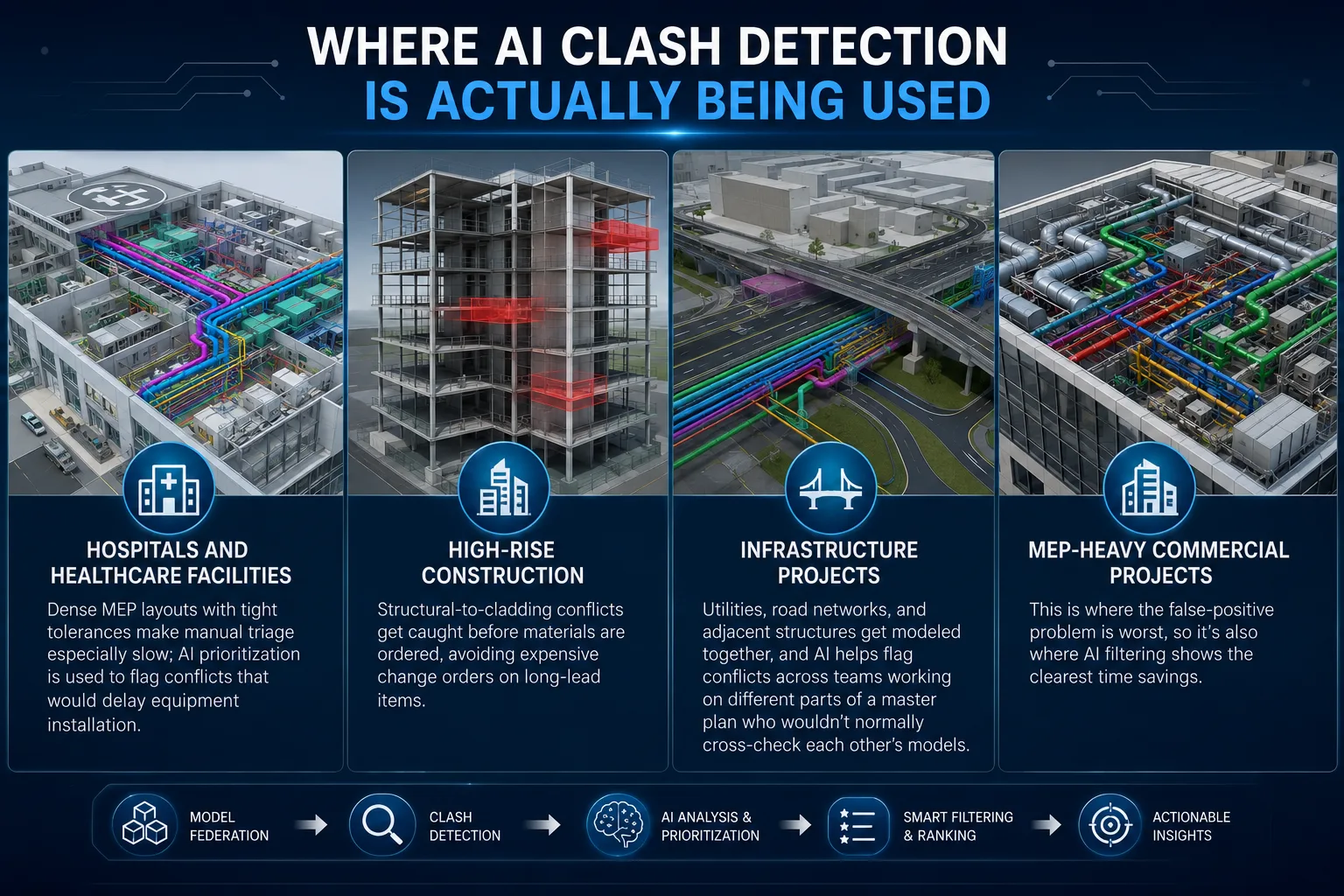
- Hospitals and healthcare facilities — dense MEP layouts with tight tolerances make manual triage especially slow; AI prioritization is used to flag conflicts that would delay equipment installation.
- High-rise construction — structural-to-cladding conflicts get caught before materials are ordered, avoiding expensive change orders on long-lead items.
- Infrastructure projects — utilities, road networks, and adjacent structures get modeled together, and AI helps flag conflicts across teams working on different parts of a master plan who wouldn’t normally cross-check each other’s models.
- MEP-heavy commercial projects — this is where the false-positive problem is worst, so it’s also where AI filtering shows the clearest time savings.
The Honest Limitations Nobody’s Vendor Page Will Tell You
This is the part worth reading before you invest in anything.
It’s not fully autonomous, and researchers are upfront about that. A 2026 study on clash risk prediction concluded that fully automating clash resolution isn’t realistic yet partly because the models aren’t there, and partly because coordination teams need time to build trust in a system’s judgment before they’ll rely on it.
Accuracy is still context-dependent. Predicting whether a clash is real is one thing; predicting how severe it is depends on project-specific circumstances that are harder for a model to generalize across. Two identical geometric clashes can have completely different real-world consequences depending on sequencing, access, and site conditions.
It needs training data to be useful. AI filtering gets better the more resolved-clash history it has to learn from. A brand-new implementation on a firm’s first AI-assisted project won’t perform as well as one that’s been fed a few years of past coordination decisions.
It doesn’t replace a coordinator. Every source that’s actually done the technical work on this (rather than just marketing it) agrees on one thing: AI narrows the list and adds context, but a human still makes the final call on anything that isn’t a clear-cut, high-confidence case.
How to Actually Get Started
- Start with your existing clash detection tool, not a new platform. Most AI value right now comes from filtering and prioritization layered on top of Navisworks or Solibri output, not from replacing them. For a broader framework on rollout, see our guide to BIM implementation and best practices.
- Feed it real history. If your firm has past clash reports and resolution decisions sitting in old project files, that’s the training data that makes filtering useful faster.
- Pilot on one MEP-heavy project first. This is where false-positive volume is highest, so it’s where the time savings will be most obvious to your team.
- Keep a human sign-off step. Don’t let the system auto-close clashes without review, at least for the first few project cycles, until you’ve validated its judgment against your own.
- Track the before-and-after. Time spent on triage per coordination cycle is the easiest number to measure, and it’s the one that will justify (or not) further investment.
The Bottom Line
AI hasn’t replaced clash detection it’s replaced the exhausting part that came after it. If your team is still manually sorting through thousands of flagged conflicts every coordination cycle, that’s the specific problem AI-powered tools are solving right now, not some far-off promise. The technology isn’t mature enough to run without a human checking its work, and any tool or vendor claiming otherwise is overselling it. But for cutting triage time and catching the clashes that actually matter, the numbers already justify a pilot.
No. BIM clash detection is the underlying process of finding geometric conflicts in a federated model — that’s been standard practice for years. AI clash detection adds a layer of machine learning on top to filter, prioritize, and sometimes suggest fixes for the clashes that process finds.
Yes, in some cases. Most AI clash tools still assume a federated 3D model, but a smaller number of platforms now run coordination checks directly on 2D PDF drawing sets, which matters for projects that aren’t fully modeled.
No. It reduces the manual triage workload, but final judgment on ambiguous or high-risk clashes still requires an experienced coordinator. Current research is explicit that full automation isn’t realistic yet.
Reported figures vary by project, but documented cases show clash resolution time cut by around 70%, and false-positive triage reduced from thousands of alerts down to a few dozen genuine decisions per cycle.
Hard clashes are physical overlaps between elements. Soft clashes are clearance violations where elements don’t touch but breach a required gap. Workflow clashes are scheduling conflicts, like two trades assigned to the same space at the same time.